Free · open source · Windows, macOS, Linux

MPV Player: the quiet, precise player for almost any file

Download MPV Player, the free, lightweight, open-source media player for Windows, macOS, and Linux. Enjoy smooth HD and 4K video playback, crisp audio, subtitle support, and customizable controls. Play your favorite media formats with speed, simplicity, and powerful performance.

Stable
0.41.0Dec 2025
Price
FreeGPLv2+ / LGPL
Engine
FFmpeg+ libplacebo
Android
mpv-androidseparate app

What is MPV Player

A media player that gets out of the way

mpv opens a window, plays the file and leaves the screen to the picture. No menu bar, no library, no sign-in.

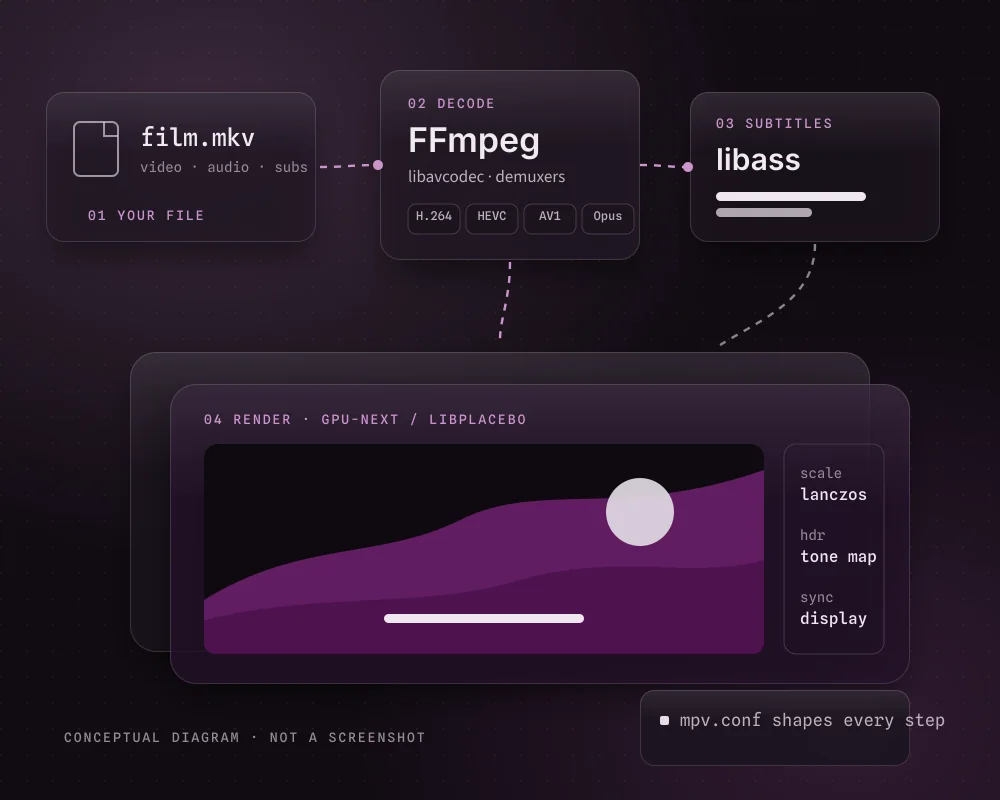
mpv is a free, open-source, cross-platform media player that grew out of MPlayer and mplayer2. Decoding is done by FFmpeg, the picture is drawn by libplacebo through the gpu-next renderer, and subtitles are rendered by libass. That combination is why people who care about image quality, or who just want a player that opens any file quickly, end up using it.

Instead of menus, you use the keyboard, a small on-screen controller that appears when you move the mouse, and plain-text settings files. That sounds technical, but a handful of keys covers daily use, and you only need mpv.conf when you want to change a default.

Read More About Us
Lineage
MPlayer → mplayer2 → mpv
Licence
GPLv2+ (LGPLv2.1+ build possible)
Controls
Keyboard, mouse, OSC, console
Extending
Lua and JavaScript scripts
Diagram: a video file is decoded by FFmpeg, subtitles are drawn by libass and the picture is rendered by gpu-next and libplacebo, all shaped by mpv.conf
From file to screen: four layers, one small settings file. Fig. 01

Features

Small window, serious playback

What mpv does well, without padding: the parts you notice on the first night and the parts you'll find later.

Rendering · gpu-next

A picture that respects the source

Since 0.41.0 the libplacebo-based gpu-next renderer is the default. It brings proper colour management, high-quality scalers, frame timing locked to your display and tone mapping that fits HDR video onto an ordinary SDR screen instead of clipping the highlights.

Formats · FFmpeg

Plays nearly anything

mpv decodes through FFmpeg, so common and obscure formats open without installing codec packs.

MKVMP4WebMAV1HEVCFLACOpusM3U
Subtitles · libass

Subtitles done properly

Styled ASS/SSA with fonts and positioning, plain SRT, embedded tracks and external files that can be loaded automatically.

Scriptable

Lua and JavaScript scripts add features, from playlists to custom key actions, without rebuilding mpv.

Plain-text config

mpv.conf and input.conf are short, portable and easy to back up or copy to a new PC.

Streams via yt-dlp

Paste a video page URL; mpv hands it to yt-dlp, if it's installed, and plays the stream.

Hardware decoding

Off by default for reliability; Ctrl+h or hwdec=auto enables it to save power.

How it works

From download to first film in four steps

No installer, no account and no library scan. A first session usually goes like this.

  1. Pick a build

    Windows uses a portable archive, Linux and macOS use packages, and Android has its own app.

    x86_64 · aarch64 · APK
  2. Extract and open

    Unpack the archive and drop a file onto mpv.exe. The window sizes itself to the video.

    drag & drop
  3. Learn a few keys

    Pause, fullscreen, seek and switch subtitles. The rest can wait.

    Spacef←→j
  4. Tune if you want

    A three-line mpv.conf covers most wishes: quality profile, hardware decoding, subtitle loading.

    mpv.conf

Use cases

Who reaches for mpv

mpv isn't trying to be a media centre. It shines when the job is to play a file well and nothing more.

  1. UC—01

    Local film and series folders

    Open an episode and the next files play in order if you drop the folder; position can be remembered with Shift+Q.

  2. UC—02

    Anime and styled subtitles

    libass keeps typesetting, karaoke and signs exactly as the subtitle author intended.

  3. UC—03

    HDR files on an SDR screen

    Tone mapping in gpu-next keeps highlight detail instead of washing the picture out.

  4. UC—04

    Lectures and talks

    Speed up with ]; pitch correction keeps voices natural at 1.5× or 2×.

  5. UC—05

    Online video without the browser

    With yt-dlp installed, paste a URL and watch in a clean window with your own keys.

  6. UC—06

    Older or low-power laptops

    Hardware decoding and profile=fast lighten the load on modest machines.

Compatibility

Where MPV Player runs

mpv's source code is cross-platform, but the ready-made builds come from different hands on each system. This table shows who provides what.

Platforms and build sources, as listed on mpv.io in November 2026
Platform Where builds come from Notes Status
Windows 10 / 1164-bit Third-party builders shinchiro and zhongfly; also Scoop, Chocolatey and MSYS2 Portable 7z archives in x86_64 and x86_64-v3 Builds available
Windows on ARMaarch64 Same builders publish aarch64 archives Native build; x64 builds may also run through emulation Builds available
Windows 32-biti686 i686 archives from the same builders Only needed on 32-bit Windows Legacy
macOS stolendata builds, MacPorts, Homebrew formula, first-party CI test builds IINA is a separate Mac app built on mpv Builds available
Linux Distribution packages (Arch, Gentoo and others), Debian multimedia, mpv-build Some distro versions are old, especially on Debian and Ubuntu Packages
BSD · Haiku FreeBSD ports, NetBSD pkgsrc, OpenBSD ports, Haiku depot Packaged by each system's maintainers Packages
Android mpv-android: Google Play, F-Droid, GitHub APKs Separate app on libmpv; Android 6+ since the 2026-08-11 build Separate app
iOS · iPadOS Not listed by mpv.io No mpv build is offered for Apple mobile devices Not listed

Search terms like "Windows 11" or "APK" don't guarantee support on their own; the table reflects what the projects themselves publish.

Choosing a Windows build

Release information

What the current release brings

Latest stable21 Dec 2025

0.41.0

Still the newest stable version in November 2026. Windows builders also publish rolling builds from the development branch between releases.

Highlights of 0.41.0

  • gpu-next is now the default rendererThe libplacebo-based renderer replaces the older gpu output by default.
  • Vulkan hardware decoding is preferredWhen hardware decoding is on, Vulkan is tried before other APIs.
  • Built-in Windows registrationmpv --register and --unregister add or remove file associations per user.
  • Better colour handlingImproved colour management for gpu-next and on Wayland.
  • New context-menu scriptcontext_menu.lua adds a menu framework; Android gains an AAudio output.
Requires
FFmpeg 6.1+, libplacebo 6.338.2+
Previous
0.40.0 · Mar 2025
Android app
mpv-android 2026-09-17 build
Licence
GPLv2+ / LGPLv2.1+

Download

Download MPV Player for Windows

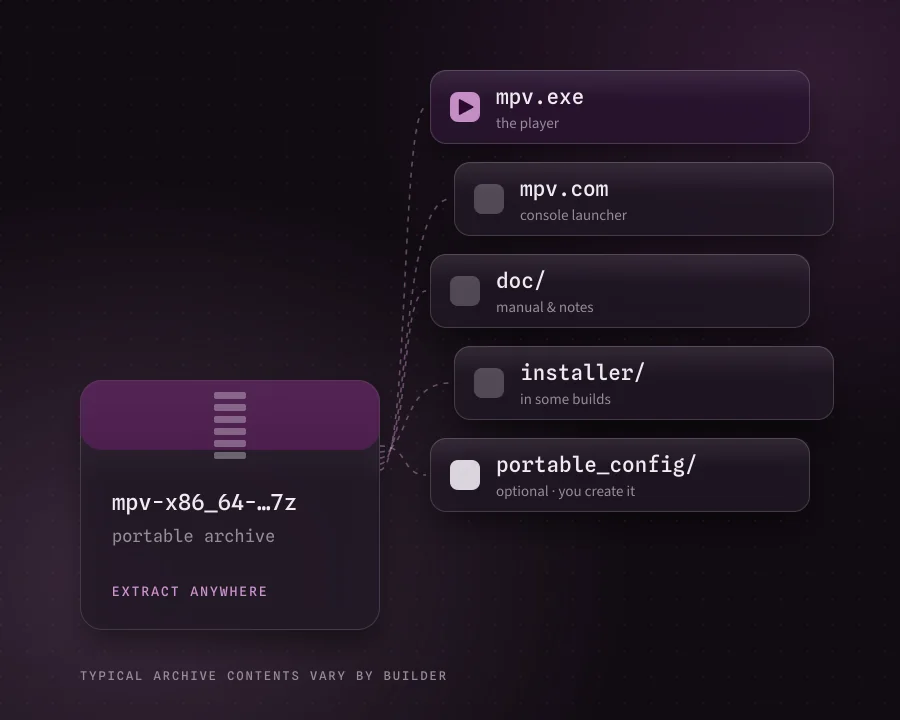
Get the free MPV Player desktop build for Windows. It's a portable archive: extract it, open mpv.exe and play. No setup wizard, no extra software, nothing to sign in to.

Windows 10 · 1164-bitPortableFree · open source
Illustration of a portable mpv archive unpacking into mpv.exe, mpv.com, a doc folder and an optional portable_config folder

Installation / setup

Setting up MPV Player on Windows

Five steps, two of them optional. The whole thing takes a couple of minutes.

  1. 01

    Download a Windows build

    Use the button in the download section, or a builder linked from mpv.io. For most 64-bit PCs the x86_64 archive is the safe choice.

  2. 02

    Extract the 7z archive to a permanent folder

    Use 7-Zip or Windows 11's built-in archive support. Avoid the Downloads folder, so file associations don't break when you tidy up.

    C:\Apps\mpv\
  3. 03

    Open a file

    Drag a video onto mpv.exe, or start mpv.exe and drop files into its window. Nothing is installed system-wide.

  4. 04

    Register mpv for file types (optional)

    From a terminal in the mpv folder, register it for your user account, then pick it in Settings > Apps > Default apps.

    mpv --register
  5. 05

    Add your settings (optional)

    Create a portable_config folder next to mpv.exe and put a plain-text mpv.conf inside it.

    portable_config\mpv.conf

Other platforms

macOS community builds

Use a stolendata build or MacPorts. Homebrew's brew install mpv installs the command-line player without an app bundle.

Linux packages

Install from your distribution, for example sudo pacman -S mpv on Arch. Check the version: some distributions lag behind.

Android mpv-android

Install mpv-android from Google Play or F-Droid, or sideload the universal APK. See the APK guide.

Full install guide for every platform

Pros and cons

An honest balance

mpv is excellent at its job, and its job is narrower than some players'. Both lists matter.

Strengths

  • Picture quality. gpu-next scaling, colour management and HDR tone mapping.
  • Format coverage. FFmpeg decoding means no codec packs.
  • Light and quick. Opens fast and has no library or background services.
  • Portable settings. A few text files carry your setup to any PC.
  • Free and open. No ads, no account, public source code.

Trade-offs

  • No menus by default. Newcomers have to learn a few keys first.
  • Settings live in files. There's no preferences window to click through.
  • Third-party Windows builds. You choose between builders and archive variants.
  • No disc menus or media library. mpv deliberately leaves these out.
  • Online video needs yt-dlp. It's a separate download that you keep updated.

Troubleshooting

When something isn't right

Most problems trace back to one setting. Change one thing at a time, and test with mpv --no-config file.mkv to rule out your own config.

T1Black or green picture

Likely cause

Hardware decoding conflicts with the GPU driver.

Fix

Press Ctrl+h, or set hwdec=no. Updating the graphics driver often helps too.

T2Stutter or dropped frames

Likely cause

Scaling settings are too heavy for the GPU.

Fix

Check the counters with i; try profile=fast or remove custom scalers.

T3No sound

Likely cause

Wrong output device, or the track is muted.

Fix

Press m and #; list devices with mpv --audio-device=help.

T4Subtitles missing

Likely cause

The file name doesn't match the video exactly.

Fix

Cycle tracks with j, or add sub-auto=fuzzy to mpv.conf.

T5URLs won't play

Likely cause

yt-dlp is missing or out of date.

Fix

Install or update yt-dlp and put it on your PATH or in the mpv config folder.

T6Settings ignored

Likely cause

The file is in the wrong folder or saved as mpv.conf.txt.

Fix

Show file extensions in Explorer and use portable_config or %APPDATA%\mpv.

More fixes and how to read an mpv log

FAQ

Questions people ask about MPV Player

Twenty short answers in two groups. Use the arrow keys to move between questions.

A / 10

Using MPV Player

MPV Player is the common name for mpv, a free, open-source media player for Windows, macOS, Linux and BSD. It descends from MPlayer and mplayer2, decodes through FFmpeg, renders video with libplacebo and draws subtitles with libass. It has no menu bar: you control it with the keyboard, the mouse, a small on-screen controller and text configuration files.

Yes. mpv has no paid edition, no trial and no account. It is licensed under the GPL version 2 or later by default, and it can also be built under the LGPL version 2.1 or later. Build providers and download hosts don't change that, so be wary of any page that asks you to pay for it.

Keeping the interface out of the way is a deliberate design choice. Playback controls appear on the on-screen controller when you move the mouse, and everything else is a key press or a line in mpv.conf. Version 0.41.0 also ships a context-menu script that menus can be built on. Separate frontends such as mpv.net (Windows), IINA (macOS) and Celluloid (Linux) wrap mpv's engine in a traditional window if you prefer that.

Space pauses, f toggles fullscreen, the Left and Right arrows seek 5 seconds and Up and Down seek a minute. 9 and 0 change the volume and m mutes. j cycles subtitle tracks and # cycles audio tracks. [ and ] change the speed, s takes a screenshot, i shows the stats overlay, q quits and Shift+Q quits while remembering your position.

On Windows, create a folder named portable_config next to mpv.exe, or use %APPDATA%\mpv\. On Linux and macOS it goes in ~/.config/mpv/. The file must be called mpv.conf, not mpv.conf.txt, which is a common mistake when Windows hides file extensions. Key bindings live in input.conf in the same folder.

No. mpv decodes through the FFmpeg libraries bundled with it, which cover nearly every common audio and video format, including H.264, HEVC, AV1, VP9, AAC, FLAC and Opus. Installing a system-wide codec pack doesn't change how mpv plays files and is best avoided.

Yes, if yt-dlp is installed. Paste or drag a page URL onto mpv and its built-in ytdl_hook script asks yt-dlp for the stream address. When online playback stops working, an outdated yt-dlp is the usual cause, so update it before changing anything else.

Hardware decoding is off by default. Press Ctrl+h to toggle it for the current file, or add hwdec=auto to mpv.conf to make it permanent. It mainly saves power and CPU time on laptops. If you see a black picture or green blocks, turn it off again with hwdec=no.

Yes. Since 0.41.0 the libplacebo-based gpu-next renderer is the default, and it handles colour management and tone mapping of HDR video on ordinary SDR screens. The built-in profile=high-quality preset switches to sharper scaling, while profile=fast lowers the cost on weak hardware.

Not out of the box. The built-in on-screen controller shows a time preview but no thumbnails. Third-party user scripts such as thumbfast add them. Copy the script into the scripts folder of your mpv config directory, and get it from its author's own page.

B / 10

Download, install and platforms

The main Download button opens the MPV Player listing on FileHorse, a third-party download host, which offers the Windows desktop build. mpvplayer.org doesn't host the file and isn't connected to the mpv project. Check the file name and scan the download before you open it.

Not a classic setup wizard. Windows builds are portable 7z archives made by third-party builders such as shinchiro and zhongfly, which mpv.io links to. You extract the archive and run mpv.exe. To add file associations, mpv 0.41.0 can register itself per user with mpv --register, and some older bundles include an installer folder with mpv-install.bat.

Pick x86_64 if you're unsure: it runs on any 64-bit Windows PC. x86_64-v3 is built for newer processors with AVX2, roughly Intel 4th-generation Core and later or any AMD Ryzen. aarch64 is for Windows on ARM laptops. You can ignore the mpv-dev and ffmpeg archives; they're for developers.

Yes. The 64-bit builds run on Windows 11 just as they do on Windows 10, and native aarch64 builds exist for ARM-based Windows 11 laptops. After registering mpv you can make it the default player under Settings > Apps > Default apps.

Builders still publish i686 (32-bit) archives for 32-bit Windows. On any 64-bit edition of Windows, use a 64-bit build instead. To check, look under System type in Settings > System > About.

On Windows, download a build, extract it to a permanent folder such as C:\Apps\mpv and open mpv.exe or drop a file on it. Optionally run mpv --register for file associations. On Linux use your distribution's package, on macOS a community build or Homebrew, and on Android the separate mpv-android app.

Yes. The Android version is mpv-android (package is.xyz.mpv), a separate app built on libmpv. It's on Google Play, on F-Droid and as APK files on its GitHub releases page. Builds since 2026-08-11 need Android 6 or newer. If you sideload, the universal APK works on every device. Our Download button is for Windows, not for the APK.

Yes. On macOS the options are community builds, MacPorts and a Homebrew formula; IINA is a separate Mac app built on mpv. Most Linux distributions package mpv, but mpv.io warns that some, especially Debian and Ubuntu, ship old versions.

Download the newer archive and replace the program files in your mpv folder. Keep your portable_config folder, which holds mpv.conf, input.conf and your scripts. If you moved the folder or associations stop working, run mpv --register again from the new location.

mpv itself is open source with a public development history. The binaries come from third-party builders and download hosts, though, so stick to known sources. Treat any "mpv setup" that offers extra software as a red flag, and scan the archive before opening it. Our safety notes and guide cover what to check.